LinkedIn Sales Navigator for Startup Sales Teams
Sales Navigator turns prospect research into a repeatable system that pays off above $5K deal sizes.
A lot of people assume Sales Navigator is just LinkedIn Premium with a fancier price tag. That assumption costs them months of underperformance.
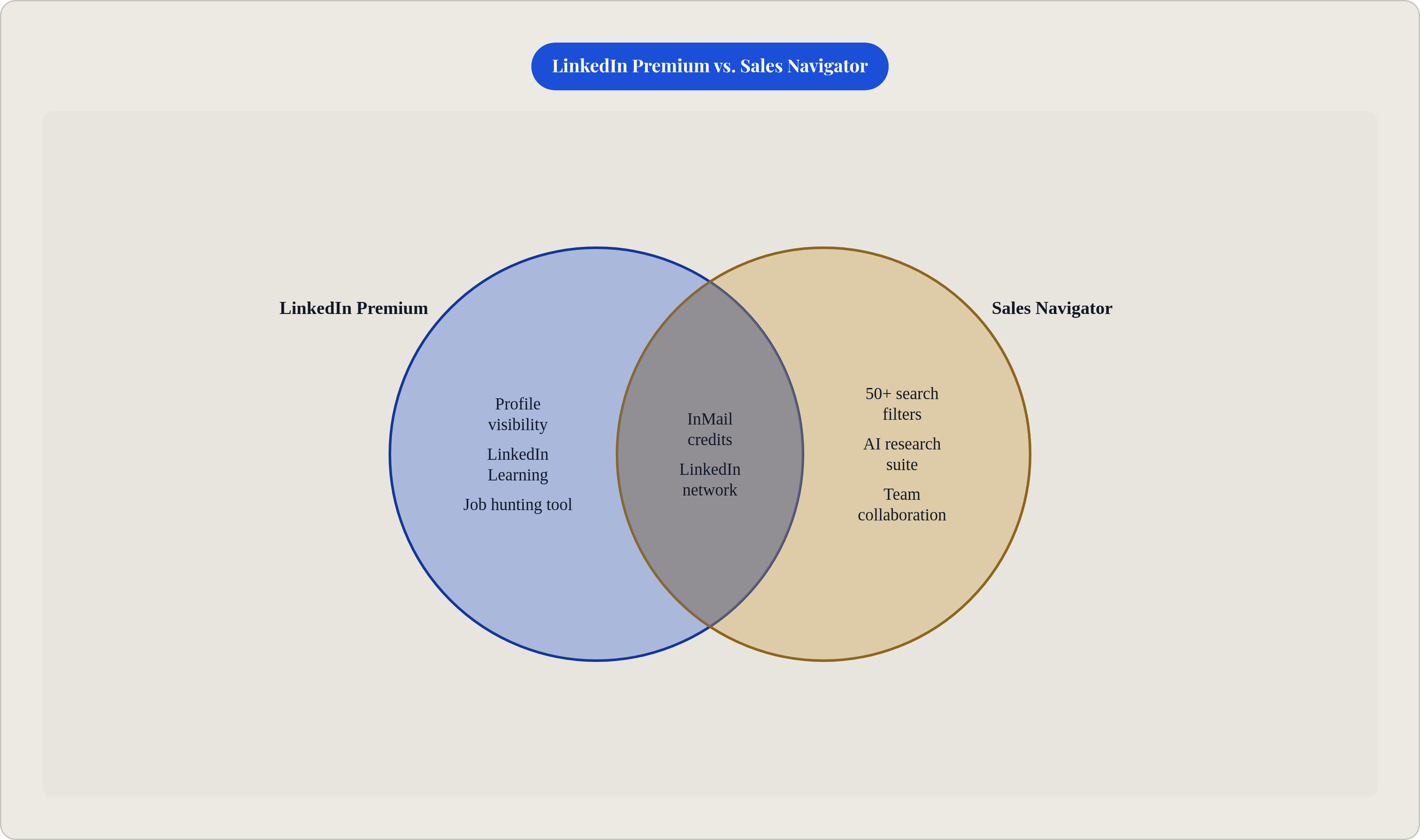
Standard LinkedIn gives you basic search, profile views, and connection requests. Premium layers on some InMail credits, profile visibility, and LinkedIn Learning. Premium is a career tool. Fine if you want to know who looked at your profile, or if you're quietly job hunting. It is not a sales tool.
Sales Navigator is a prospecting operating system. Over 50 advanced search filters. Saved lead and account lists. Real-time alerts. AI-powered research. Team collaboration features. The whole thing is built around outbound workflows, not passive browsing.
Here's the mental model that actually stuck for me: Sales Navigator is to LinkedIn what a CRM is to a spreadsheet of contacts. You could technically limp along with the simpler version. But you won't use it the same way, and your results will show it.
Over 1.5 million sellers worldwide were using it as of 2025. This is not a niche product.
The teams that treat it like a fancier search bar — with no defined ideal customer profile to anchor their searches — end up using maybe 20% of what they're paying for. That's the trap. It's an easy one to fall into because nobody at LinkedIn calls you to say you're leaving money on the table.
How the Three Plans Break Down and Which One Most Startup Teams Actually Need
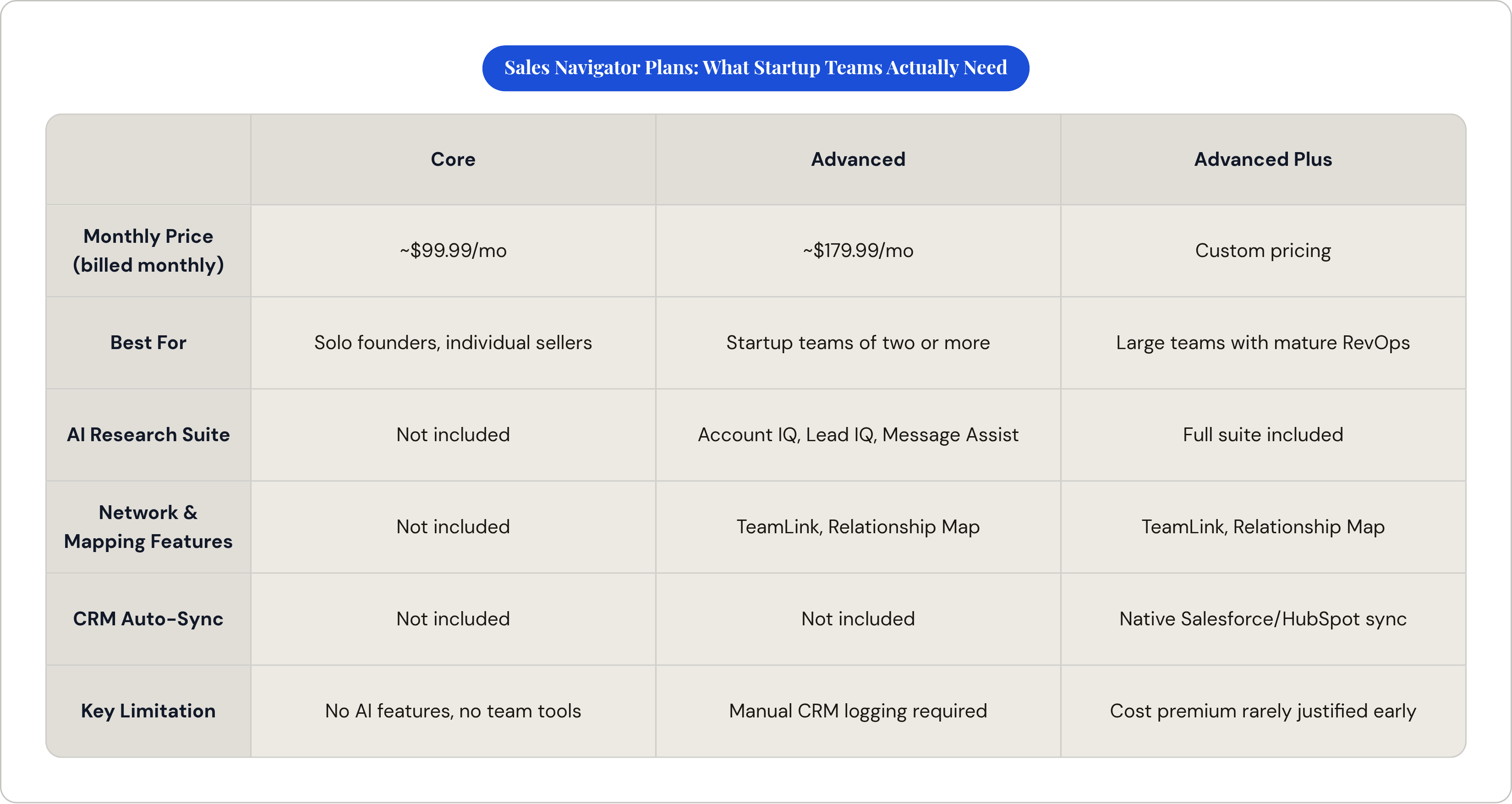
Three tiers as of 2025. Here's what actually matters:
Core (formerly Professional)
- Around $99.99/month billed monthly, or roughly $79.99/month on annual
- Built for individual sellers or solo founders
- Gets you advanced search, 50 InMail credits per month, lead recommendations, and alerts
- No Account IQ, no Lead IQ, no TeamLink, no Relationship Map, no Smart Links, no Message Assist
Advanced (formerly Team)
- Around $179.99/month billed monthly, or roughly $139.99/month annually
- The right call for most startup teams of two or more
- Full AI research suite, TeamLink, Relationship Map — the features that actually change how you work
Advanced Plus (formerly Enterprise)
- Custom pricing
- Only makes sense when your team is running Salesforce or HubSpot tightly and needs automatic CRM sync baked in
A few things worth knowing before you hand over a card number:
There's a 30-day free trial if you're not currently on a paid LinkedIn subscription and haven't burned a trial in the past year. Use it. The Microsoft for Founders program offers a 75% discount on Sales Navigator for four months. Check that before paying full price. On a startup budget, both of these add up fast.
Annual billing saves roughly 25% versus month-to-month. That's real money.
One mistake that kills ROI fast: sharing one Core license across multiple reps to cut costs. TeamLink, one of the most useful features on the platform, depends on each rep's individual network. Share a login and you break it entirely. You've also just turned your investment into an expensive search bar.
When the Investment Pays Off and When It Doesn't. The Honest ROI Picture.
There's a Forrester study from October 2023, commissioned by LinkedIn, that found a 312% three-year ROI from Sales Navigator. That number gets cited everywhere, including by LinkedIn's own sales team when they're trying to close you.
Here's what it actually measured: a composite company with $250 million in revenue, 250 Navigator users, and a dedicated SDR team on Advanced Plus. Not a startup. Not you.
The study broke down over a million dollars in higher-quality lead revenue, more than two million in research efficiencies, and productivity savings built around 15 minutes per day per salesperson. Real numbers, for organizations that built their entire workflow around the tool.
LinkedIn's internal data from October 2025 shows the average Sales Navigator user made five times more connections to Director-level and above leaders than non-users. Teams saw meaningful increases in average deal size and a real lift in sales opportunities created.
Here's where it actually works for startups:
- Average deal size is above $5,000. Against a $50K ACV deal, the seat cost stops being a concern.
- Your buyers are on LinkedIn. They post, comment, update their profiles. They're reachable.
- Your team is in the tool every day, working it, not just checking in when pipeline looks thin.
Here's where it doesn't:
- Deal size is under $3,000. The tool cost becomes a meaningful fraction of revenue per deal.
- Your buyers are in SMB, trades, or blue-collar industries with thin LinkedIn presence. A tool built for where your buyers aren't is just overhead.
- Your team treats it like a database to browse when they're bored rather than a workflow to run every morning.
The ROI case is real. It's just not passive. Nobody gets 312% ROI by logging in twice a month and running a title search.
The Search Filters That Separate Deliberate Prospecting from Random Browsing
Sales Navigator has more than 50 advanced search filters. Most teams use maybe four: title, industry, company size, location. The rest sit there while reps wonder why their prospect list feels identical to everyone else's.
Two filters consistently outperform everything else for startup teams:
"Changed jobs in the last 90 days"
New executives are evaluating inherited tech stacks, hunting for early wins, and spending budget before someone higher up freezes it. They want to move fast and look decisive. Combine this with seniority and function filters to surface actual decision-makers, not the junior analyst who just got their first official LinkedIn title.
"Posted on LinkedIn in the last 30 days"
Active posters are more likely to see your outreach. More importantly, they've already told you what they care about. Their content is a non-generic reason to reach out. You're not guessing at a hook. They handed you one.
A few habits that make search repeatable instead of manual:
Save your ICP as a recurring Lead Filter. LinkedIn updates suggestions automatically as new profiles match your criteria. New matches surface without you re-running the same search every Tuesday. Small thing that compounds.
Build and maintain an exclusion list. Save accounts you never want to contact: existing customers, competitors, your own investors' portfolio companies. Reps accidentally touching the wrong targets is a real problem, and a preventable one.
The edge Sales Navigator creates in search isn't just access to the platform. It's filter depth. The difference between a generic prospect list and one that's actually worth working.
Using AI Features to Compress Research Time Without Adding Headcount
The core constraint for every startup sales team is the same: no research bench. No SDR army. Each rep researches, personalizes, and sends, all at speed, all day. The AI features in Advanced are built specifically for that problem.
Account IQ generates account briefs by pulling from LinkedIn data, Microsoft, and OpenAI models. Company priorities, recent signals, strategic context, all in seconds. Personalized outreach built on Account IQ insights has been associated with a 22% higher InMail response rate, per 2025 LinkedIn data. That's not a small number when your credits are finite.
Lead IQ does the same thing at the individual level. Career history, likely motivations, shared connections, recent posts, conversation starters. Useful specifically for the first message, when you need a hook that doesn't sound like a template. It's not a replacement for actual judgment. It gets you to a decent first draft in three minutes instead of twenty-five.
Message Assist is in public beta as of 2025. It drafts InMail copy using Account IQ and Lead IQ context. The best use is treating it as a rough structure with a decent hook, then rewriting it until it sounds like a person sent it. Because if it reads like AI wrote it, your response rate drops. People can tell. They've been getting those messages all year.
None of this exists on Core. If you're on Core, this entire section is a preview of what you'd get if you upgraded.
What the AI suite actually does for a small team: it compresses hours of pre-call research into minutes. For a two-person startup team, that's the difference between five personalized touches a day and twenty. The math is pretty obvious.
Multi-Threading Accounts Instead of Single-Contact Outreach
Fifty-eight percent of B2B purchasing decisions now involve six or more stakeholders. If you're running single-contact deals, you're one champion going quiet away from a stalled opportunity you never saw coming. Their boss said no in a meeting you weren't invited to, and you'll spend three weeks following up on something that's already dead.
Multi-threading isn't optional. The platform is built for it.
Relationship Map (Advanced and Advanced Plus) is a visual map of the buying committee. Org hierarchy, relationship strength, recent trigger events. Reps who use Relationship Maps engage two to three times more stakeholders per account. That directly reduces deal risk in a way that better discovery questions can't fully fix.
The practical habit: build the map before the first discovery call. Know who else touches the buying decision before you're deep in a deal and finding out the hard way that your champion doesn't have budget authority. I've been in that situation. It's not fun and it's avoidable.
TeamLink (Advanced and Advanced Plus) shows warm connection paths through your team's combined network. Before you spend an InMail credit on a high-value account, check TeamLink first. A warm introduction from a shared connection converts at three to five times the rate of cold outreach. A two-person startup team often has more warm paths into target accounts than either rep realizes. Networks overlap in ways that surprise people.
Relationship Explorer surfaces additional decision-makers at target accounts who fit your ICP but weren't in the original search. Think of it as the "find the rest of the committee" button for accounts already in your pipeline. Use it on every account above your deal-size threshold.
The habit that changes outcomes: for every account above a certain size, map the committee before the first touch. Not after your champion goes dark.
Writing InMails That Actually Get Responses
InMail response rates run between 18 and 25 percent. Cold email sits around 3 to 5 percent. The channel advantage is real. A bad message wastes it.
You get 50 InMail credits per month on Core and Advanced. That ceiling is actually useful. It forces prioritization. Don't spend credits on low-signal prospects when trigger-event targets are sitting in your saved list.
The highest-performing InMails open with something specific. A job change. A post they published. A funding round. A news mention. InMails that reference a specific trigger outperform generic ones by two to three times in response rate. This is exactly why the "changed jobs" and "posted recently" filters matter: the research and the message hook are literally the same workflow.
For high-value accounts, the sequencing that works:
- Send a connection request first
- If accepted within 30 days, engage via direct message. Free. No credit used.
- If the account still warrants it after 30 days with no response, deploy an InMail credit with a trigger-anchored opening line
- Use Lead IQ's conversation starters as input, not as something you paste directly into the message
After the message goes out, Smart Links are useful as a follow-up layer. Share a case study or a deck via Smart Link and track who clicked and for how long. It surfaces genuinely warm prospects from a list of maybes, which helps you prioritize when credits are spent and you're deciding where to put your time next.
Turning Sales Navigator Into a Repeatable System, Not a One-Off Search Tool
The pattern that kills ROI: reps open Sales Navigator when pipeline is thin, run a search, send a few InMails, close the tab, and don't come back for two weeks. That produces zero compounding value. The tool has to become part of the weekly rhythm, or it's just an expensive LinkedIn subscription that makes someone feel productive.
What a repeatable system looks like for a two-person startup team:
Monday (30 minutes): Review new lead matches from saved filters. Check Account Hub for trigger events across saved accounts — job changes, news mentions, funding rounds. Prioritize based on signal strength, not gut feel.
Tuesday through Thursday: Outreach blocks. InMail credits go to trigger-event prospects. Connection requests go to the broader ICP list. Every high-value account gets a TeamLink check before a credit gets spent.
Friday: Pipeline review cross-referenced against Relationship Maps. Update stakeholder maps for any active deals where the buying committee has shifted.
Account Hub is your daily dashboard for saved accounts. Treat the alerts as a prioritization signal, not a to-do list. Not every alert warrants a response. High-value triggers from priority accounts get a same-day response. Everything else gets batched.
One thing that rarely gets mentioned: on Core and Advanced, nothing syncs automatically to your CRM. Activity data disappears unless someone logs it manually. Build that habit immediately, or pay for a third-party connector. Pipeline visibility breaks fast when you're not tracking what's been touched.
The gap between a startup that gets real ROI from Sales Navigator and one that doesn't is almost always usage consistency. Consistent use of Core beats inconsistent use of Advanced every time. The tool is not the variable. The habit is.
What to Skip and What to Watch as the Product Evolves
Not everything in Sales Navigator is built for a startup. Some of it is enterprise infrastructure wearing a "for everyone" label.
Skip these at startup scale:
Advanced Plus CRM auto-sync is genuinely valuable when you have a large team and a mature RevOps function. For most startups, the cost premium over Advanced often exceeds what you'd save compared to manual logging or a lighter third-party connector. Run the actual math before paying for it.
Embedded Profiles and Embedded Experiences — native integrations with tools like Gong and Salesforce — are designed for larger RevOps teams with dedicated tooling. They're overkill before you have a documented sales process worth embedding anything into. If you're still figuring out your ICP, this isn't where your money goes.
Large-volume InMail automation. The 50-credit ceiling exists for a reason. Trying to work around it with connection-request spray defeats the targeting advantage the tool provides. Precision is the point. Automating volume is the opposite of that, and LinkedIn will notice.
Watch the pricing trajectory.
Core went from roughly $779 per year in 2022 to approximately $960 per year by 2025. LinkedIn has raised prices consistently. Factor that into annual planning. The discounts through the Microsoft for Founders program and annual billing are worth locking in now while they're still in their current form.
The product itself is moving fast. The AI features in public beta today will be standard within a year or two. If you're on Advanced and haven't touched Account IQ, Lead IQ, or Message Assist yet, start there. That's clearly where LinkedIn is putting its development resources, and the teams building workflows around those features now will have a real head start when the capabilities get deeper.
Used deliberately — right plan, right filters, consistent weekly rhythm — Sales Navigator is the best prospecting tool a small B2B sales team has access to right now.