Best CRM Software for B2B Startups
Startups lose deals to follow-up failures, not weak prospects—here's which CRM fits your stage.

Sales reps spend roughly 28% of their time actually selling. The rest evaporates into admin, digging through old email threads, and trying to remember what was said on a call two weeks ago. If you've ever worked an early-stage sales role, that number probably lands less like a statistic and more like a personal attack.
Without a system, follow-up runs on memory. Memory is a terrible CRM. Leads go dark not because the deal was dead, but because nobody followed up on day 12 and deal velocity quietly died with it. Nobody remembered. There was no system to remember for them, because nobody had bothered to build one yet.
The damage shows up in predictable places:
- Lost deals. Winnable ones. Gone because the timing slipped on a follow-up that was nobody's official job.
- Bad forecasts. A missed forecast at a startup isn't a rounding error. It's a runway miscalculation. Pipeline visibility is one of the most consistently reported benefits of CRM adoption for a reason.
- Wasted rep time. Every hour spent reconstructing deal context from old Slack threads is an hour not spent moving anything forward. Multiply that across a few reps and a few months.
- Churn risk. If any of your revenue is recurring, retention matters from day one. Most B2B companies eventually use CRM specifically for customer retention. The smart ones start early rather than waiting until "eventually."
The math is simple: businesses consistently report strong returns on CRM spend, often multiples of what the tool costs. Skipping a CRM to save money is like bailing out a sinking boat with a teaspoon — you're working hard, but you're still going under. Not complicated. Just easy to rationalize away when you're busy doing everything else.
The Criteria That Actually Matter When a Startup Picks a CRM
Features only matter if people use them. That sounds obvious. It apparently isn't, given how many startups pick a CRM off a feature checklist and then watch it go untouched while the team defaults back to the shared spreadsheet they started with.
Adoption beats capability every time. An unused CRM is worse than a well-kept spreadsheet. It creates the illusion of process without any of the actual benefit. Buy for this quarter's needs, not a two-year wish list you probably won't get to.
The functional checklist that actually matters:
- Lead, contact, and account management
- Visual pipeline tracking
- Email sync and activity logging
- Basic automation (follow-up reminders, deal stage triggers)
- Reporting a non-analyst founder can read without a tutorial
- Integrations with tools already in use
Two things most startups underweight when they're shopping.
Scalability. Can this CRM go from two users to fifty without a painful migration? Ask that on day one, even if you're currently a team of three. Migrations under pressure are expensive, disruptive, and very avoidable.
Total cost of ownership. The monthly seat cost is just the entry point. Integration work, custom development, training, and support costs diverge sharply from sticker price as teams grow. Factor all of it in.
AI is now a real factor. Around 70% of companies are using AI features in their CRM, including tools for forecasting, lead scoring, and outreach. Those features almost always sit behind higher pricing tiers. Find out exactly where they unlock before committing.
The rest of this piece is organized around stage fit, because the right CRM for a three-person pre-revenue team with a short sales cycle is a genuinely different tool from the right CRM for a twenty-person team with a dedicated sales manager.
For Pre-Seed and Seed Teams: Getting Pipeline Visibility Without Operational Overhead
The goal at this stage is narrow. Get deals out of founders' heads and into a shared system. That's it. You're not building a sales ops infrastructure. You're creating a place where more than one person can see what's happening.
Three tools that actually fit here.
Salesflare
Built specifically for B2B sales. Supports multiple contacts per account, tracks relationships across a team, and pulls data automatically from email and calendar. It basically fills itself in via automated data capture, which matters enormously when there's no sales ops person and founders are juggling five other things simultaneously. Strong fit for small teams who want pipeline management without spending a day on configuration.
Zoho CRM Free Tier
Free forever for up to three users. Covers leads, contacts, deals, tasks, events, and mobile apps. Zoho is genuinely undermarketed relative to HubSpot, but it works. If you're already using other Zoho tools like Zoho Books or Zoho Desk, the integrations are smooth and the broader ecosystem starts making real sense quickly.
HubSpot Free Tier (With Caveats)
Wide name recognition, and useful at zero cost: shared inbox, contact management, deal tracking, basic reporting. The constraints show up fast, though. Contact cap, two-user limit, no automated workflows. Those limitations often force an upgrade within six to twelve months of real growth, so budget for it before you need it.
Start here if marketing automation is part of the near-term plan. Just be prepared for the upgrade to arrive faster than you expected.
The trap at this stage is picking a free tier that doesn't scale, then scrambling through a migration six months later while also trying to close a big quarter. Think about the upgrade path on day one. It's not overthinking. It's avoiding a very predictable headache.
For Startups with Early Revenue and a Small Sales Team: Pipedrive as the Sales-First Option
Once you have two or three dedicated salespeople, the priorities shift. Pipeline clarity and rep accountability become the actual job. Marketing automation can wait.
Pipedrive was built by salespeople, for salespeople. Visual pipeline, intuitive deal progression, a workflow organized around how reps actually move through a day. The model is three steps: configure your pipeline, monitor progress, automate the repetitive parts through workflow automation. It's not trying to be everything. That restraint is a feature.
Pricing that is actually transparent:
- Essential: $14/user/month (pipeline, contacts, basic reporting)
- Advanced: $34/user/month (email sync, automation, calendar)
- Professional: $49/user/month (revenue forecasting, email sequences, calls)
A ten-person team on Pipedrive Professional runs roughly $490/month. The equivalent HubSpot tier runs closer to $1,000/month. For a startup watching burn rate, that gap is not trivial. Most capabilities are included in the base plans and surprise add-ons are rare, which is more than you can say for a lot of the competition.
Pipedrive added an AI assistant in 2024. It flags stalling deals and nudges reps toward next steps. Useful, unobtrusive, and nowhere near HubSpot's automation depth. Several features were still in limited availability as of late 2025, so avoid choosing Pipedrive solely because of the AI story.
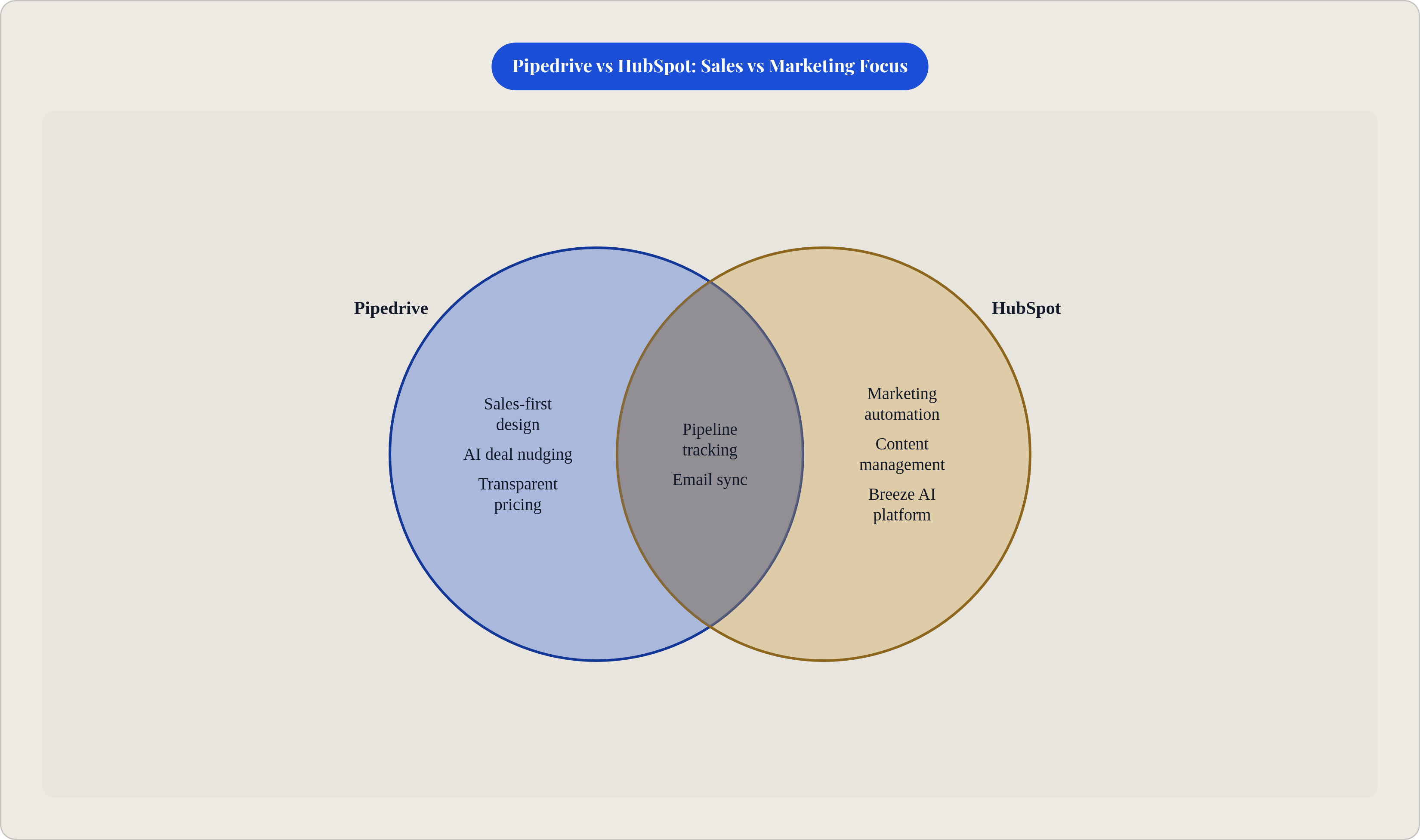
The known limitation: post-sale is where Pipedrive stops. Email marketing is thin. There's no meaningful post-close nurturing and no marketing automation worth mentioning.
Pick Pipedrive if you have a separate marketing tool and just need a clean sales CRM. Move to HubSpot if marketing automation is part of the same buying decision.
For Startups Where Marketing and Sales Need to Share a System: HubSpot's Paid Tiers
HubSpot's value proposition sharpens significantly when marketing and sales need to work from the same data. Shared contact records, campaign attribution, pipeline tracking, forms, email marketing, content management, and reporting without stitching four different tools together. That integration tax is real. HubSpot eliminates it, which is genuinely worth something.
The AI story is strong. HubSpot's Breeze platform covers conversation intelligence, content generation, and forecasting. It's leading the mid-market in AI breadth right now. The catch: the AI add-on runs an additional $30/user/month, which raises total cost of ownership in ways that aren't obvious from the headline pricing.
The cost escalation problem is worth taking seriously. Paid tiers run from free through $800-plus per month for Pro. Fully unlocked functionality starts above $1,200/month. Startup discounts exist and are meaningful in year one. They also expire. Pricing can increase by roughly 90% after promotional periods end. A CRM migration off HubSpot once contacts, campaigns, and workflows are embedded is a significant project. Possible, but painful.
HubSpot for Startups program: if you're VC-backed or affiliated with an incubator or accelerator, you likely qualify for 30 to 90% off in year one. Startups that have raised under $2M can get up to 50% off. Apply before committing to anything. It changes the math substantially.
HubSpot is powerful and increasingly expensive. It's the right call when inbound marketing is a primary growth channel and the budget can absorb the step-up. When those two conditions aren't true, something else will fit better.
For Startups Building Toward Enterprise Deals: When Salesforce Starter Suite Makes Sense
Salesforce is the default enterprise CRM. It has held over 20% of the worldwide CRM market and has been named the number one CRM provider for more than a decade. For startups selling to enterprise buyers, that dominance is actually a feature. Being on the same platform your prospects already use creates familiarity and makes integration conversations with procurement teams easier.
Starter Suite has made Salesforce accessible in a way it genuinely wasn't a few years ago:
- $25/user/month
- Contacts, pipeline, and basic reporting in a single workspace
- Agentforce agents (added in late 2025) that can proactively research leads and draft proposals without being manually triggered
That last point is not a minor detail. Salesforce's Agentforce and Data Cloud product line reached nearly $1.4 billion in ARR by Q3 FY2026, up 114% year-over-year. That's the fastest-growing product category in Salesforce history. The AI direction is well-funded and moving fast, which matters if you're choosing a system you expect to grow into over the next few years.
Where the caution lives:
- Deeper customization and enterprise reporting require an admin or a consultant
- Implementation costs often exceed seat license costs in the first year
- Under fifty seats, it's usually overkill
The startup that should actually consider Salesforce looks like this: fifteen-plus person team, active enterprise pipeline with deals involving procurement and legal review, heading toward a Series A or beyond, and wanting a system that won't need replacing in two years. If that's not where you are yet, the other options in this piece will serve you better and cost less in the meantime.
Zoho CRM: The Underrated Option for Cost-Conscious Teams That Need More Than the Basics
Zoho doesn't top many "best of" lists. That's a marketing problem more than a product problem, and it ends up costing teams real money because they never seriously evaluate it.
Paid plans start around $14/user/month on annual billing. The top plan is $52/user/month. That sits well below HubSpot Pro at comparable feature depth. Over two to three years, the total cost difference can be meaningful enough to matter to a startup watching burn.
What you actually get:
- Pipeline tracking, analytics, workflow automations, and built-in AI tools in one platform
- More than 2,500 Marketplace extensions, giving you integration breadth comparable to larger platforms
- Reporting that punches well above its price point
The real limitation: Zoho lacks HubSpot's marketing automation breadth. It fits sales-first teams better than startups where complex inbound marketing is the primary growth lever. The onboarding experience is not polished. Plan to invest time in self-directed setup.
But the functionality is there, and for a revenue-focused team that wants a capable CRM without committing to HubSpot's pricing trajectory, Zoho deserves a real look before you default to whatever has the biggest marketing budget.
How to Match Tool to Stage: A Decision Framework for Founders
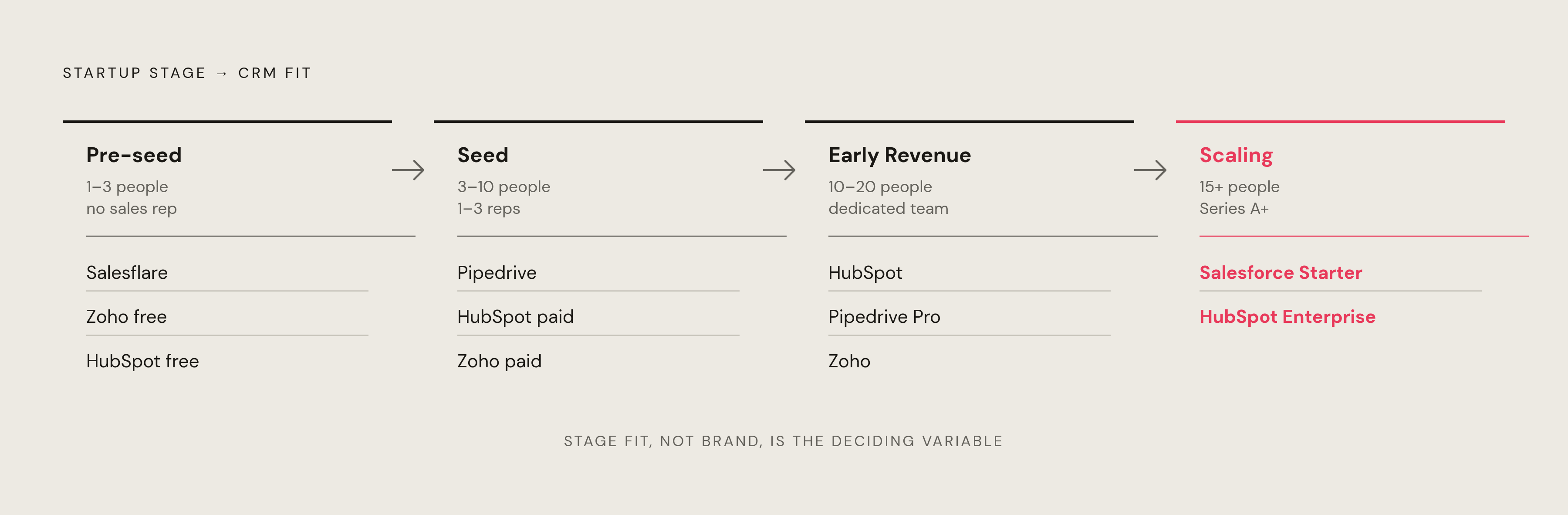
Four variables drive this decision: team size, deal complexity, whether marketing and sales need to share a system, and where the budget is actually going.
Pre-seed. One to three people, no dedicated sales rep:
- Salesflare if you want auto-capture and B2B-native relationship tracking with minimal setup
- Zoho free tier if you want something functional for up to three users at zero cost
- HubSpot free tier if inbound marketing is part of the near-term plan. Track the upgrade timeline and budget for it before it catches you off guard
Seed. Three to ten people, one to three sales reps, active pipeline:
- Pipedrive if sales is the core motion and you have (or plan to have) a separate marketing tool
- HubSpot paid if marketing and sales need to share one system and you qualify for the startup discount
- Zoho paid tiers if budget is constrained and you need more than the free tier without committing to HubSpot's pricing trajectory
Early revenue. Ten to twenty people, dedicated sales team, growing deal complexity:
- HubSpot if inbound is a primary channel and you're prepared for the cost step-up
- Pipedrive Professional if the team is sales-first and the marketing motion lives in a separate tool
- Zoho if the team wants HubSpot-comparable depth at a lower price and is willing to invest time in self-directed setup
Scaling toward enterprise. Fifteen-plus people, enterprise pipeline, Series A or beyond:
- Salesforce Starter Suite to get on the right platform early and grow into it
- HubSpot Enterprise if the inbound and marketing automation motion is strong and the budget supports it
The best CRM is the one your team will actually use, because user adoption is the only metric that makes the rest of the evaluation matter. All the features in the world mean nothing if reps go back to updating a shared Google Sheet because the CRM felt like extra work. Start simple. Get adoption. Then scale into complexity. That order matters more than which logo is on the login screen.