B2B Sales Prospecting Tools Compared
Modern outbound requires multi-channel speed, not just contact lists.
None of the tool comparisons below matter if you don't understand what outbound actually looks like right now.
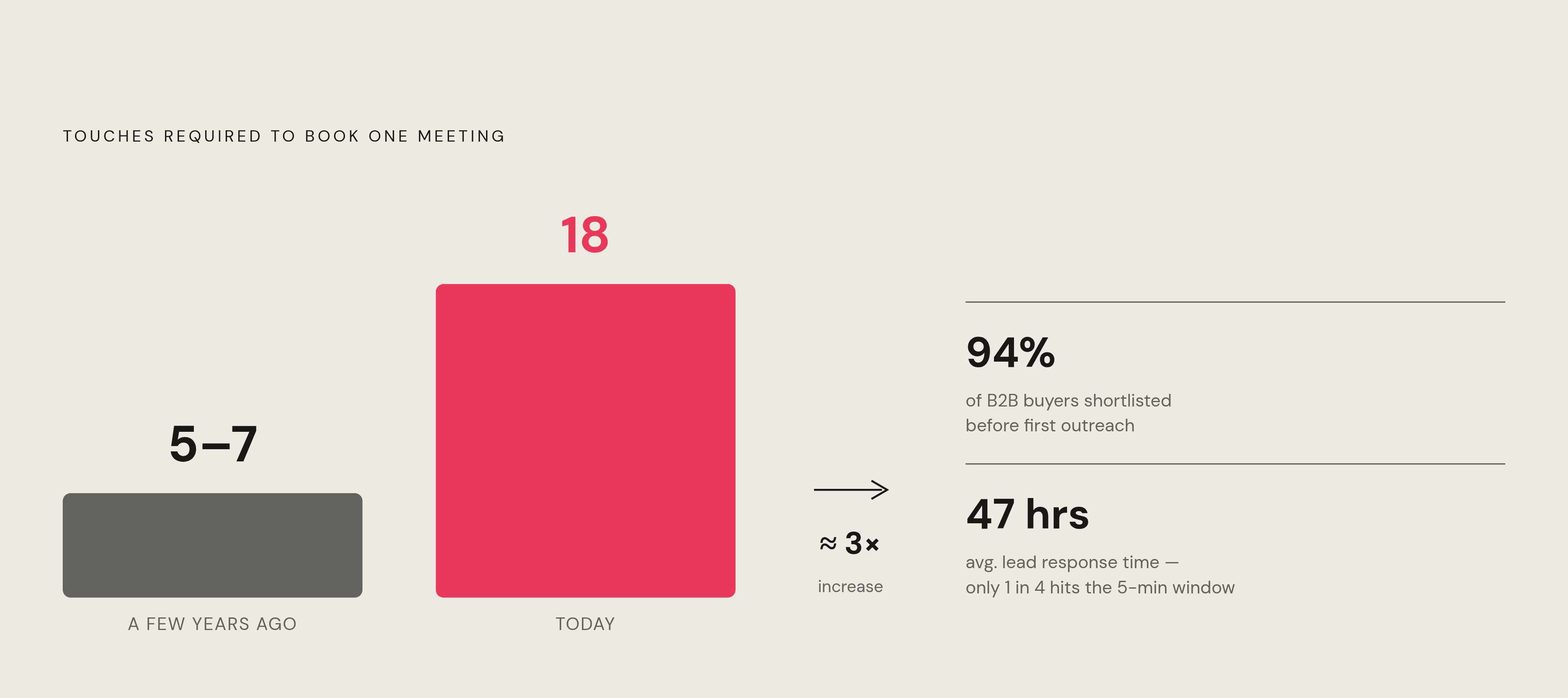
It takes 18 touches to book a single meeting. A few years ago that number was 5 to 7. The volume of work required just to get someone on the phone has roughly tripled, and most teams haven't changed how they operate at all. Manual, single-channel outreach at that scale isn't just inefficient. It's a losing strategy from the first dial — like bringing a rotary phone to a drone war.
A few other things that have quietly become true:
- Buyers shortlist vendors before you ever reach out. 94% of B2B buying groups have already decided who they're interested in before engaging anyone. If you're not visible before outreach starts, you're already playing catch-up.
- You're rarely selling to one person. The average sales cycle now runs about 6.5 months across roughly 25 stakeholders, which is why multi-threading has become a baseline skill rather than an advanced one. A tool that finds you one contact at an account leaves most of the decision-makers invisible.
- Email still works. Email alone doesn't. Most B2B buyers prefer email, but email-only campaigns are generating fewer leads year over year. Meanwhile, a growing share of reps say social prospecting now delivers the highest cold outreach response rate of any channel.
- Speed is the variable most teams underestimate. Contacting a lead within five minutes makes qualification dramatically more likely than waiting 30 minutes. The average B2B lead response time is 47 hours. Only about one in four companies actually hits that five-minute window.
What this adds up to: your stack has to support multi-channel sequencing and fast, signal-triggered outreach. Not as a nice-to-have. As a baseline requirement. If yours fails to do that, you're not shopping for the wrong tool. You're asking the wrong question.
How to Read a Prospecting Tool Comparison Without Being Misled by Feature Lists
Feature tables are almost useless. Rows of checkboxes tell you what a tool has, not whether it helps. Database size doesn't tell you if the data is accurate. Feature count doesn't tell you if the tool fits how your team actually works.
Three questions that cut through most of the noise:
1. Does this tool add steps or remove them? A tool that makes you export a CSV, clean it, and reimport it into your sequencer is not saving time. It's adding friction. A tool that lives inside your CRM or sequencer removes a step that was already happening. That distinction matters more than any feature comparison.
2. How accurate is the data, based on something other than what the vendor published? No sales software vendor has ever published a number that made them look bad. Find third-party benchmarks. Read G2 reviews filtered by your segment. Go look at Reddit threads from people with no incentive to spin anything.
3. Does what it automates match where your team is actually losing time? AI tools embedded in a rep's existing workflow save roughly two hours per day. AI tools that live in a separate tab someone opens twice a week save close to nothing. The automation has to meet people where they're already working.
There are five broad categories of prospecting tools: contact databases, engagement platforms, intelligence layers, workflow automation, and AI-native agents. Most teams overspend on the first two and barely touch the last two. Comparing a database tool to an engagement platform is a category error. Both matter. They are not the same thing. Know which category you're actually shopping in before you evaluate anything.
ZoomInfo: When Data Depth and Intent Signals Justify the Price
ZoomInfo is the biggest contact database you can buy access to. Hundreds of millions of contact profiles, over 100 million company records, and over 120 million direct dials verified through machine scanning, partner feeds, and in-house research.
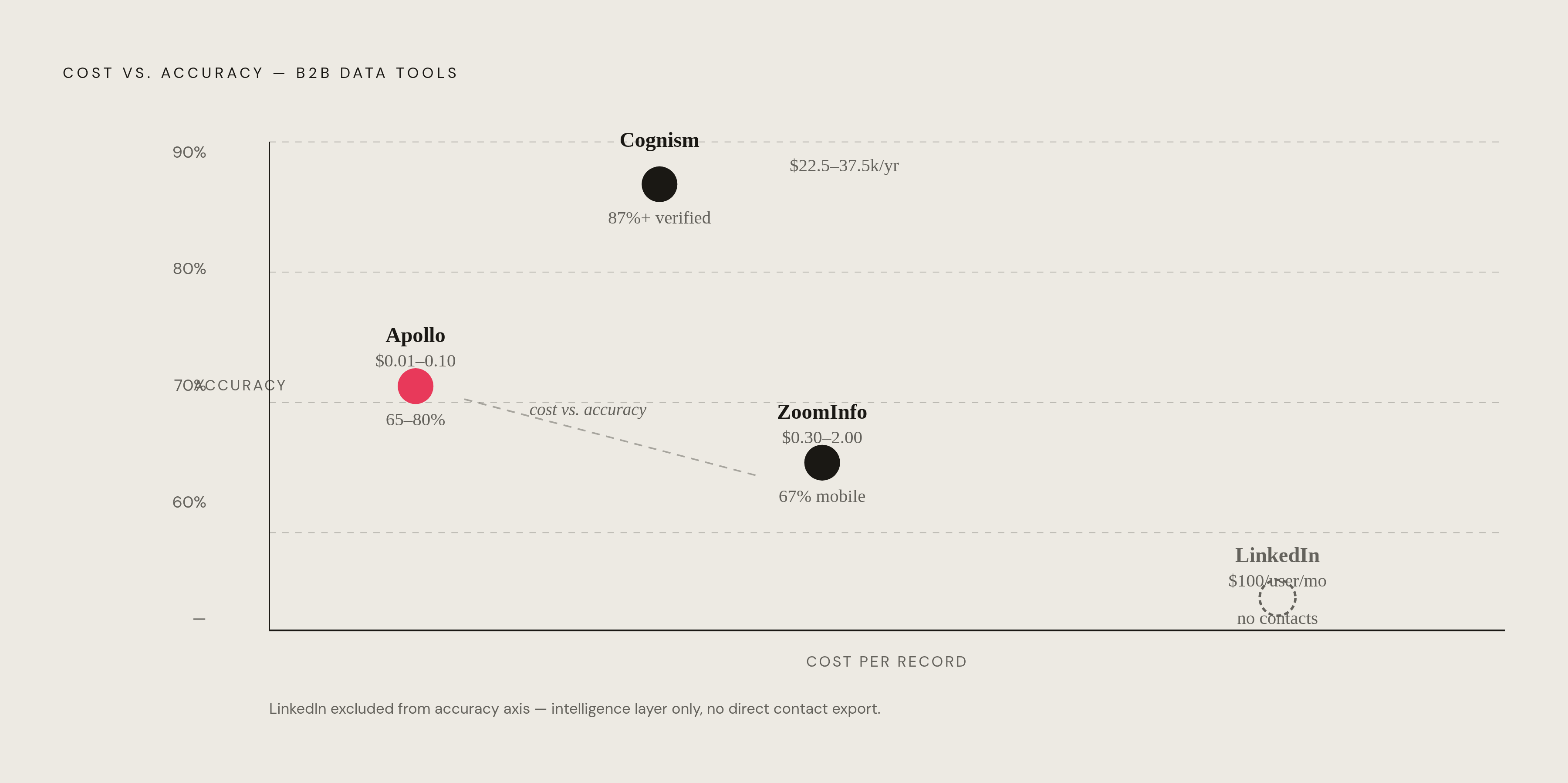
The number that actually matters comes from independent testing. A 2026 benchmark queried 1,000 identical leads on the same day across platforms. ZoomInfo returned a mobile number for 67% of records. Apollo returned one for 41%. That's a 26-point gap. If phone outreach is central to how your team operates, that difference has real consequences in rep time wasted on dead ends.
What keeps ZoomInfo from being just a very large database is the intelligence layer. Their GTM Context Graph processes over 1.5 billion data points per day, pulling together CRM records, conversation data from Chorus (their call recording acquisition), and behavioral intent data to surface accounts that are actively researching solutions. That's what justifies the price over pure database competitors. Without it, you're just paying a premium for a contact list.
Where it earns its keep:
- High-volume phone outreach where verified mobile coverage is the actual bottleneck
- Intent-triggered sequencing at enterprise accounts
- Teams where a bad phone number costs more in rep time than a premium data contract
Where it runs into trouble: EMEA outbound. Bad numbers and mismatched contacts for European records show up repeatedly in recent G2 reviews. This isn't a fringe complaint. It comes up enough that if European outbound is a meaningful part of your motion, ZoomInfo's pitch doesn't hold the same way.
On pricing: the median contract runs just under $32,000 per year, and real spend often lands between $30,000 and $60,000. No public pricing, no monthly option. You're negotiating an annual or multi-year commitment before you've proven anything. The effective cost per usable record lands somewhere between $0.30 and $2.00 once you factor in contract size. That number is what makes the decision real for smaller teams, and for most of them, it ends the conversation pretty quickly.
Apollo.io: The All-in-One Case for Earlier-Stage and Cost-Conscious Teams
Apollo is structurally different from ZoomInfo in one important way. It's not just a database. It combines a 275 million-plus contact database with built-in email sequencing, a power and parallel dialer, email deliverability tools, and a visual workflow engine with conditional logic. You can run outbound from one platform without buying a separate engagement tool.
The pricing reflects that. Free tier available. Paid plans start at $49 per user per month, billed annually, with transparent per-seat pricing. No forced negotiation, no mysterious annual contract, no sales call required before you can see a number.
The cost per usable record is significantly lower than ZoomInfo. Roughly pennies to around $0.10, compared to ZoomInfo's $0.30 to $2.00 range. That gap is why Apollo is where most teams under 50 reps start, and honestly, why a lot of teams under 50 reps stay.
The caveat on data accuracy is real. User-reported accuracy lands somewhere in the 65 to 80% range, which is lower than ZoomInfo's tested figures. That means you should budget for list cleaning. Running a sequence on unvalidated Apollo data without scrubbing first will hurt your sender reputation and long-term deliverability. It's a step you cannot skip.
Apollo crossed $150 million in annual recurring revenue in 2025 across roughly 100,000 paying customers. That scale funds ongoing data investment and confirms that the free and low-cost tiers are a real on-ramp rather than bait toward an enterprise contract.
The trade-off is pretty simple: ZoomInfo has the best data and the worst price. Apollo has the best price and requires the most cleanup. Both are accurate. The question is which constraint your team can actually live with, and for most teams under 20 reps, the answer is pretty obvious.
Cognism: The EMEA and Compliance-First Case for Phone-Verified Data
Cognism exists because of a specific gap that ZoomInfo and Apollo both leave open. Accurate, GDPR-compliant phone data for European markets, where data protection regulations make list quality a legal question, not just a performance one.
The product's signature feature is Diamond Verified Data. Over 10 million mobile numbers that have been manually confirmed as live and belonging to the correct contact. Not algorithmically validated. Actual human verification. Vendor-claimed accuracy on these records runs above 87%, with a 20% connection rate on phone outreach.
Two things to check before treating those numbers as your expected outcome:
- Diamond Data is a subset of the full database, not the whole thing. The share of your target accounts that fall within it varies. Confirm that before assuming 87% is your effective accuracy rate.
- There is no built-in sequencing, dialer, or outreach engine. Cognism integrates with Salesforce, HubSpot, Pipedrive, Outreach, and Salesloft, and there's a Chrome extension. But you still need to budget for a separate engagement platform on top of it.
Pricing lands between roughly $22,500 and $37,500 per year for a small team, which puts it between Apollo and ZoomInfo on cost. The value case rests entirely on whether improved connect rates in EMEA justify that price compared to cleaning Apollo lists or living with ZoomInfo's documented European gaps.
Cognism is not a stack replacement. It's a data layer upgrade for teams already running a sequencer who find that European outbound is underperforming because of bad numbers. If that's not your problem, it's probably not your tool. Which is actually kind of refreshing for a vendor to be honest about, even if they aren't the ones saying it.
LinkedIn Sales Navigator: The Relationship-Mapping Layer Every Stack Needs but Often Misuses
Sales Navigator is built on LinkedIn's first-party graph. Advanced search filters, lead recommendations, InMail credits, job-change alerts, account activity signals. For enterprise outbound, it's close to table stakes.
What it is not: a database replacement. No phone numbers. No technographic data. No competitive intel. You can't sequence from it. You can't dial from it. Intelligence is entirely LinkedIn-native.
The misuse pattern is predictable. A team buys Sales Navigator, treats it as a primary data source, and then wonders why pipeline is thin. The right use is account mapping and trigger-signal tracking. Use it to identify the full buying group at a target account. Watch for job changes. Look for signals that suggest an account is in motion. Then take that context into Apollo or ZoomInfo for contact data, and into Outreach or Salesloft for sequencing. Sales Navigator tells you who to care about and when. It doesn't replace the tools that help you actually reach them.
Social prospecting now delivers the highest cold outreach response rate of any channel, according to a meaningful share of reps surveyed. LinkedIn is the primary B2B social channel. That makes Sales Navigator close to required for most enterprise teams. But required as a layer, not a standalone. The distinction matters.
Pricing is relatively accessible at roughly $100 per user per month, which is one of the more reasonable per-seat costs in this comparison given what it does.
The practical pairing that actually works: Sales Navigator for mapping the buying group and tracking signals. Apollo or ZoomInfo for contact data. Outreach or Salesloft for sequencing. Each tool doing one thing, not three tools trying to do each other's jobs.
Outreach and Salesloft: What a Dedicated Engagement Platform Adds Once the Stack Has Data
If your data problem is solved, the next question is execution at scale. That's where Outreach and Salesloft live. Both are built for workflow enforcement: structured sales cadences, call recording, AI-driven sequence optimization, manager visibility into rep activity. Neither replaces a data source. Both assume you already have one.
Outreach is the market leader in sales engagement. Advanced sequencing across email, phone, and LinkedIn. Call recording built in. AI optimization that adjusts sequence recommendations based on performance data. Pricing starts around $130 per user per month with an annual commitment and implementation fees. The strongest case is for teams of 20 or more reps who need rigorous cadence enforcement and management-level reporting. Below that headcount, the overhead starts to outweigh the structure.
Salesloft merged with Clari in 2026. The combined platform now brings sequencing together with pipeline forecasting and deal inspection. Pricing runs $125 to $165 per user per month, more transparent than Outreach on cost. Better fit for teams that want coaching insights layered on top of execution data, and for leaders who want to connect what reps are doing to what's actually closing.
That merger is worth paying attention to more broadly. Combining engagement data with revenue forecasting in one platform is where the market is heading. Execution data feeding revenue prediction, without exporting between systems, is a real workflow improvement for the teams that have the scale to take advantage of it.
One number to keep in mind: running a team of 20 reps on either platform plus ZoomInfo can easily clear $150,000 per year before implementation. That's not a reason to avoid them. It's a reason to go in with clear eyes about what you're committing to.
Apollo's built-in sequencing is enough for teams under roughly 15 reps with a straightforward outbound motion. It stops being enough when you need multi-manager reporting, advanced A/B testing at the cadence level, or the ability to connect pipeline activity to rep behavior patterns.
Clay, Lusha, and HubSpot Breeze: Tools That Solve Specific Workflow Gaps Rather Than Replace the Stack
These three tools don't belong in the same category as each other. They're grouped here because none of them is a full prospecting stack. Each solves a specific problem, and knowing which problem you actually have matters more than anything else in the evaluation.
Clay
Clay is for teams that treat data quality as a workflow problem rather than a vendor problem.
It runs waterfall enrichment across more than 100 data providers, charging only for successful matches. You can pull from Apollo, ZoomInfo, Cognism, and others inside one table without paying directly for all of them. The logic behind waterfall enrichment: try the cheapest source first, fall back to the next if there's no match, keep going until you get a result.
The best use case is enrichment before you sequence, not standalone prospecting or TAM mapping. Teams burning deliverability on bad data often find Clay valuable at exactly this step. It's one of those tools that sounds like overkill until the day you realize how much time your ops person spends doing manually what Clay does automatically.
Plans start around $167 per month, not per seat. Useful for ops-minded teams who want to build enrichment workflows without maintaining five separate vendor relationships.
Lusha
Lusha is the lowest-friction entry point in this entire comparison. Browser extension, surfaces emails and phone numbers directly from LinkedIn profiles, free plan available, paid plans starting around $36 per user per month.
The database is smaller than Apollo or ZoomInfo. Accuracy is solid for the price. It's not a high-volume outbound solution. The right fit is individual reps who need quick lookups without logging into a separate platform.
One thing worth noting: Lusha ships a Model Context Protocol (MCP) server, making it one of the few prospecting tools with documented support for AI agent integration. That's a forward-looking move, and it signals something about where product development in this category is actually heading.
HubSpot Breeze Intelligence
Breeze is for teams already inside HubSpot. Full stop.
Clearbit was absorbed into Breeze Intelligence, delivering enrichment and visitor identification without adding a vendor or an integration. If you're running HubSpot as your CRM, this is seamless in a way that external tools genuinely aren't. If you're not, there's not much of a reason to look at it.
Vendor claims include significant reductions in research time, higher response rates, and more leads per team. Take those as directional. Vendor ROI figures have a well-established optimism problem, and this category is no exception.
One practical note: standalone free Clearbit tools were sunset in 2025. If your team was relying on free Clearbit for enrichment, that workflow is gone. Plan accordingly before you find out the hard way.
AI-Native Prospecting Tools and What They Actually Automate Versus What They Still Require a Human For
This is where the most hype lives, so let's actually look at what's real.
AI-native prospecting tools represent a genuinely different architecture. They're not engagement platforms with an AI tab bolted on. They're designed to run prospecting steps autonomously, without a rep initiating each action.
Artisan (AI BDR)
Artisan's product, Ava, operates as an autonomous BDR. She finds prospects, writes and sends sequences, runs A/B tests, and enriches data without a rep touching each step. The platform includes its own B2B lead database, email deliverability tools, and automated background testing.
The question worth asking before you buy isn't about the feature list. It's: what does a human still need to approve, correct, or escalate? And what happens when the AI gets it wrong?
Because it will get it wrong. The question is how often, how badly, and whether the workflow surfaces those errors before they reach a prospect. Any vendor who can't answer that clearly is telling you something important, even if they don't mean to.
What AI Actually Automates Right Now
- List building and initial enrichment
- First-draft personalization at scale
- Sequence scheduling and send-time optimization
- A/B testing across subject lines and message variants
- Follow-up timing based on engagement signals
What Still Requires a Human
- Judgment calls on whether an account is actually a fit
- Response handling when a prospect engages and the conversation gets complex
- Relationship development past the first meeting
- Strategic decisions about which signals to act on and which to ignore
- Quality control. Someone has to check what the AI is sending, at least until you've built enough of a track record to actually trust it
Nine in ten sales teams either use or expect to use AI agents within two years. That shift is real. The teams that benefit most are the ones who treat AI as a workflow component with a specific job, a defined scope, and someone accountable for what it produces. The ones who get burned are the ones who turn it on and stop looking. That's a management problem dressed up as a technology one.